I doubt that the composers of the music used in the very few N163 games were exposed to an impairing hiss.
Maybe they were, and that's why some games only used 4 channels (Of course they could've just used ROM space for something else) but I also support adding and option to turn the accurate emulation on or off because it might just drive some people away from making anything with it thinking "meh not gonna use N163 cause it will sound horrible".
That's another reason why I personally think things like hardware decay should be supported. I mean, isn't the purpose of Famitracker besides creating 8-bit music to simulate the NES chip? (But then, I'm not sure PPMCK supports the hardware decay feature. If it does, please let me know.)
There was actually only one composer who used 8-channel N163, Hirohiko Takayama, who did two games for Atlus in 1988. All other games using N163 were 4-channel.
Yes, the RF demodulation process contains a strong lowpass filter which greatly reduces the aliasing noise. Probably he tested his composition on a TV rather than listening to output directly from the cartridge. (Most of his composing time I suspect was spent on a computer or with midi hardware, not the NES directly.)
If you want, you can turn on a strong lowpass filter in the Famitracker sound settings (turn the treble filtering frequency down to around 8000Hz and crank it way up to -70db or so).
I know Hiro. I could ask if you want.
The NES composers I know say they had their computer hooked up to a big silver box that emulated the NES chip.
Though the Beam Software composers told me they played back their music by exporting it to a cartridge and playing it on an NES.
If you do indeed know Hirohiko, I think practically everyone here would be greatly interested in how he composed using the N163, and if he had known about the hiss or not.
I think I remember him telling me his NES music was composed on the PC-Engine or some Japanese computer like that. I'll ask him later today and let you guys know.
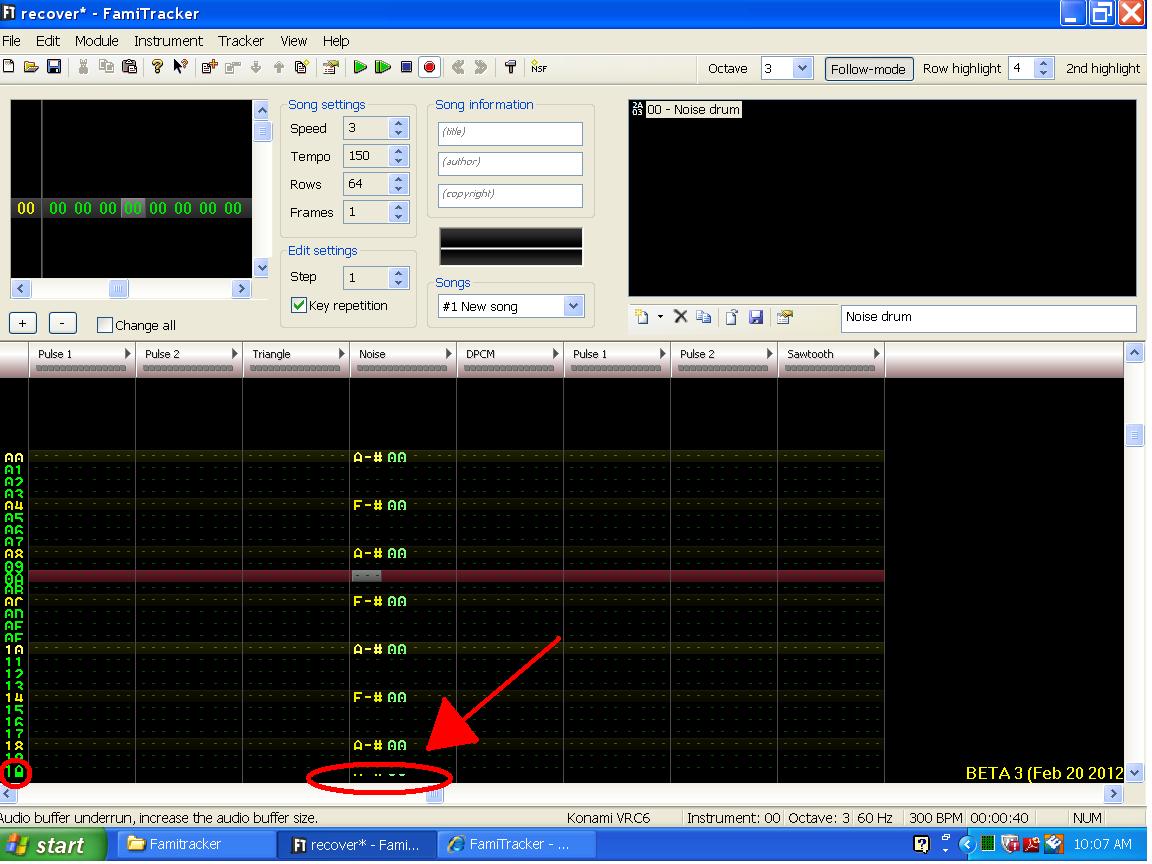
Okay, I don't know if anyone else has noticed it, but I haven't seen this one in a while:
When the .ftm is playing, and it starts scrolling down, it gives me this thing I point out in the image. Also, if you look you'll notice that the bottom of each row is cut off.
When it disappeared before (when I got 0.3.7), it coincided with me getting a new computer that had Windows 7 (rather than XP) and a higher-resolution screen. However, now I am at my grandparents house, using an old Windows XP machine. I'm not sure if this is caused by low resolution, or if it's an XP bug, but I feel like I was just kicked in the head by it :P
Also, I was making the shown .ftm, and it crashed once without an error message, minidump.dmp, or recover.ftm. Then, when I gave it another shot, it crashed normally, giving me the recover.ftm (shown in the image), minidump.dmp, and an error message. I think the reason it didn't give me ANYTHING the first time is because this computer is about 10 years old... The crash is interesting though. I'll include the screenshot I took and the .dmp file.
Dunno if this helps (and most of my speculation is just that - speculation)... If anyone has any ideas on how I can prevent it from happening again, please let me know. Thanks!
When the .ftm is playing, and it starts scrolling down, it gives me this thing I point out in the image. Also, if you look you'll notice that the bottom of each row is cut off.
For this problem, I think it has to do with whatever font you have FamiTracker set to use for the pattern editor. Go into Configuration, click the Appearance tab and try changing the pattern font and size to 'MS Sans Serif' and '12' (if they are not set to those already). Any change?
Yes, it no longer gives me the weird graphical error. I just played around with it a little bit, and found that, in "fixedsys", increasing the font size affects row height more than it does font height. Or at least, doesn't cut off the bottom of every letter.
One question though: Why does this happen on older computers (particularly ones that run XP)? On my 7 machine, "fixedsys" works fine at 12-point font. Is it a font issue, a resolution issue, or what?
Edit: Funny story, while I was scrolling through fonts, it crashed again... I forgot I could printscreen, and while I attempted to copy the error message it gave me into Notepad it actually closed the error message. I remember the code (if that's what it was) was "C0000005". At least, the C and 5 enclosed many 0s, and I just put enough here to make 8 characters. I'll attach the .dmp.
EDIT #2: I just received a PM from someone who wished to remain anonymous, and it explains things well enough for me to understand it. If anyone disagrees, feel free to explain it.
An Anonymous Person wrote:
Your graphical bug is only half related to famitracker. Windows gives programs without need for graphics rendering via the card different cycles in the actual processor to update the top 510 and the bottom area of the program's display. This usually isn't a problem, as programs without need for full-fledged rendering abilities also usually don't update the video a lot.
What I know about why this would be an exceptional problem for you is Windows XP places the top cycles first, while newer windows versions(what I expect JSR to be programming on) place the bottom cycle first. This is really only a problem if your computer is slow, if your processor graphics are given every 128th or greater cycle, or if you are using a lot of processor at that moment.
Now, the part where famitracker comes into some fault is that it updates video more but, like many MCK programs I have used, seems to insist it uses every other processor graphics cycle, meaning 64th and greater becomes the problem.
Thank you, anonymous person... now the only unexplained technical derping I have is in regards to the instacrash, which I believe is related to the fact that the computer I'm using is older than the first shit taken on Earth.
FYI: On Windoze, Error C0000005 is a segmentation fault (segfault, signal SIGSEGV). It means at some point it does illegal access to some part of memory (i.e. virtual memory not allocated to the process). It can be caused by some common errors in programming like accessing a 'freed' pointer or 'off by one' access into an array.
What you could do to really help is finding how to trigger the crash, all the time or most of the time at least, in a minimal working example (example: play and then edit instrument).