TechEmporium: I am unable to reproduce the bug. I load a playlist, turn shuffle off, and can go back and forth between the first/last songs OK. With shuffle on, obviously, going back or forward from the first or last song does not lead to the last or first song as you'd expect.
TechEmporium: I am unable to reproduce the bug. I load a playlist, turn shuffle off, and can go back and forth between the first/last songs OK. With shuffle on, obviously, going back or forward from the first or last song does not lead to the last or first song as you'd expect.
cpow wrote:
When you uncheck items in the playlist, they will be removed from the playlist file that you save, and won't show up the next time the program is loaded...I think. "Rescan" brings removed items back. "Use INI" reverts to an unloaded playlist--back to the folders you'd picked in the INI file. I'll look into the bug report. Thanks again!
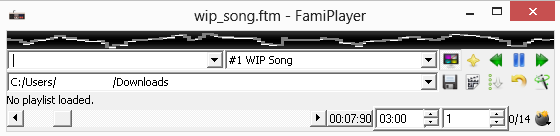
Well, that helps because I'm not loading the playlist from any external file other than the INI in the AppData folder, nor am I saving the playlist. The Rescan button is grayed out when using the INI file only, so trying to rescan folders won't work. Shuffle is also off. Here's a screenshot of my window (using Windows 8 64-bit). I erased my user name, but everything else is as I see it when I run the program.
Note: this is the final FTM file in that folder & the file list drop-down menu is blank after having pressed [>>] (the drop-down menu won't even drop down to show any white space instead of file names).
Anyways, I've put an alternative (temporary) download link for the portable version of FamiPlayer:
The short answer is the INI isn't really a "playlist" it is just a list of folders. If you're using the INI then all *.ftm files in the folders you've picked with the browse button [the floppy disk] will be in the 'playlist'. Removing songs via the check-mark approach is only valid when you're creating a playlist by "save" in the playlist editor. I see your point though that rescan should be available if there's no playlist loaded because you could have added a bunch of FTMs to a folder and you'd have to restart the program to get it to 'rescan' the folders in the INI. That is, in fact, how I tested the fix for the crash when the program tries to load a song that it found when it started up but that isn't there when the user selects it. Ideally, perhaps, a rescan should occur on each song-switch...at the very least a re-scan of the folder containing the current/next song.
That link 404's?
Also, the screenshot you posted is odd. I don't know why the borders around the time limiter and loop limiter are so strange.
_______________________
"im going to continue making this crazy stuff then after a while my style will be so sick that you will be like damn suuun that shit is so sick i dont even get it. i will be like bro its ok.. you dont have to." -omgdonut
Also, the screenshot you posted is odd. I don't know why the borders around the time limiter and loop limiter are so strange.
That's most likely an artifact caused by my making the program more portable (unless it's just Windows 8 being retarded with GUI themes as usual).
I also think you may be overlooking something in the way drop-down listings behave (i.e.: though you may see the full list of file names, there may be one extra blank option in that drop-down that's hidden from users, but would only appear when you hit the [>>] button). It could be anything, really.
TechEmporium: any chance I can get you to try to create a minimal playlist that shows the problem, with a few songs you can share? I can't get it to happen here.
In Qt, when you clear() a drop-down, it is truly clear. If you remove the INI file and relaunch the app and try to click on the drop-down, you should not get any response.
Basically, the bug I found happens when I populate the drop-down menu via the floppy disk button ONLY (no playlist file is saved through the playlist editor). All I'm doing is playing files immediately after clicking on the floppy disk button; I'm not clicking on the clapboard button to edit/save any playlist files.
Anyways, the bug seemed to have fixed itself after I deleted the CSPSoftware folder on my system & reran the player. Perhaps, this bug may appear if you choose a second directory with the floppy disk button & continue to play everything without saving a playlist (i.e.: choose a second directory which may not have any FTM files or where you may have moved/deleted all FTM files).
I think I found yet another bug too (this time, with the audio engine). Try playing the attached file in FamiTracker & in FamiPlayer; see if you notice any difference in the way the triangle channel behaves. Could it be something to do with using note-stops in the triangle channel?
_______________________
Technology: the one thing that's hated & cursed at by all engineers, technologists, scientists & technicians!
I assume you mean MFC FamiTracker versus Qt FamiPlayer? If so, the difference could have something to do with the former using DirectSound and the latter using SDL. Qt FamiTracker and Qt FamiPlayer should sound identical since they use the same FamiTracker base.
When I play just the triangle channel in MFC FamiTracker and then do exactly the same in Qt FamiTracker the sound is *identical*. There seems to be something strange going on though -- but it happens in both versions of FamiTracker and in FamiPlayer. The triangle channel stops playing most notes once it gets to frame 1. Then is silent in frame 2. This is not a bug introduced in FamiPlayer, nor in Qt FamiTracker. Perhaps it belongs in the 0.4.2 buglist.
Tech: You forgot to reset the volume back to non-0 in the triangle. It's not a bug.
_______________________
"im going to continue making this crazy stuff then after a while my style will be so sick that you will be like damn suuun that shit is so sick i dont even get it. i will be like bro its ok.. you dont have to." -omgdonut
TechEmporium: Ok thanks for the clarification, also. I've managed to reproduce the problem. Indeed it occurs if you add a folder that does not currently have any FTMs in it. I need to cogitate on the best way to handle this. My initial thought is to allow the addition of the folder even if there's no FTMs. Then just programmatically avoid the folder for as long as it still has no FTMs in it while playing songs.
Fixed bug where autoplay was the default behavior even when the autoplay button was not checked.
Added logic to allow addition of, but programmatically ignore, folders that do not [currently] contain any FTM files to the INI list of folders to play from.
Added 'remove folder' functionality to playlist editor. Un-checking the check-box next to a folder removes it. But removing folders from a loaded playlist only takes effect if the playlist is *saved*.
Disabled UI elements when no songs are available to play, so that playing the "Untitled" blank FTM that's loaded by FamiTracker's innards does not confuse people.
Removed "browse" button from main UI, moved its functionality to playlist editor's "Add Path" button.
Updated playlist behavior to make INI-based and file-based playlists nearly *identical* except for where they are stored and the fact that you don't need to "save" an INI-based playlist.
Added capability to remove folders/songs from any playlist.
Added "modified" asterisk to playlist editor window and confirmation of change-discard for file-based playlist if "Ok" is clicked without "Save".
As usual, if I can find time I'll do a Linux build.
News: a refurbished MacBook Air is on its way to me, so I'll finally be able to build OSX version of FamiPlayer in addition to Windows and Linux versions. It's been pretty quiet so I can only assume that means there are no more bugs to squash.


 )
) .png)