I don't know, as I've used 3.6 and I've had no problem using Sxx commands simultaneously with other commands and it doesn't work. But yes, I had the same problem in 3.5.
There is a "remove unused patterns" command, but in the next release, I'd like to see a "remove duplicate patterns" command. It can get hard keeping track of what patterns you've made and what you need to make a new one for, so being able to have the program scan for duplicate patterns and replace them with the original would be useful to reduce clutter.
_______________________
If there is evil in this world, it lurks in the hearts of man.
--Trinicus D. Morrison
The Final Fantasy IX 8-bit project: 3 complete
http://famitracker.shoodot.net/forum/posts.php?id=1624
There is a "remove unused patterns" command, but in the next release, I'd like to see a "remove duplicate patterns" command. It can get hard keeping track of what patterns you've made and what you need to make a new one for, so being able to have the program scan for duplicate patterns and replace them with the original would be useful to reduce clutter.
A new request: The ability to modify the FDS channel's volume from 0 to 32 using the volume channel column only.
EDIT: Also make the Axy slide through all volumes. If I make something like this:
C-4 00 F A01 (the F is made to reduce inconsistencies)
It only slides through all even numbers from 30 to 4.
EDIT2: Add new effects E1x to retrigger the E0x fade-out effect I mentioned before.
Here's a bit of audio driver trivia for you. If you listen carefully to some of the longer notes with vibrato you can sometimes hear a little bit of cyclic clicking. This was a side-effect of the way I programmed the vibrato. On the APU, writing to the register that has the upper 3 bits of the frequency setting causes an audible click. This is because if you are using the hardware envelopes/timers, it's this register you write to to initialise the envelope/timer (I actually don't use the hardware envelopes or timers).This is not so bad at the start of a note where it's hardly noticed but because the APU is being written to every frame in my audio driver, I would only write this register when absolutely necessary. Therefore, because the vibrato programming is making small cyclic adjustments to the lower 8 bits of the frequency setting, most of the time it's not necessary to write the upper 3 bits. However, if when you add a value to the lower 8 bits it causes an overflow and therefore a requirement to increment/decrement the upper 3 bits, it meant that the upper 3 bits register had to be written, causing a cyclic click in the voice output. Normally I'd get around it by transposing the whole track up/down a semi-tone or two until I was lucky enough not to have any long notes that exhibited this side-effect. I didn't always spot them, as you can now hear. If you listen closely.
tadpole: I have actually tried that technique once a long time ago. I think it was even back in the thread on 2a03.org, I don't remember if I mentioned it or not. However, I had to remove it again once I found out that it wasn't widely supported on NSF players back then. The problem is that trick relies on a very specific behaviour in the APU to be emulated correctly, and if it isn't then the 3 upper period bits will be lost (note pitches will fail) and there is no way to automatically fall back to the usual method.
I could add it back and make it optional, but it would result in NSFs that clearly will fail on some NSF players. I wonder if that would be a good idea? Another option is to enable it only on exported .NES files.
I can see it work's perfectly in NTRQ though, as it works fine when using on the real NES and emulators are generally more accurate than NSF players.
i think that in VRC7 channels... Vxx should switch between "preset instruments"... that way i wouldnt hav eto make 15 instruments to access all of the presets
Instruments on the MIDINES are determined by changing CC data. Would love to have flawless FamiTracker / MIDINES integration. Would be a dream come true for sure.
Unless you know a better way to interface to a NES.
_______________________
in search of the perfect companion for my MIDINES
I know this is probably the weirdest request but in the next version, can there be a tuner? Not the fine pitch but like, an actual tuner so you can make your songs sound sharp? I am tired of having to use the fine pitch effect because sometimes it doesn't work when I need it to. For example, Dirty Harry's music is sharp and it doesn't sound right because the fine tune can't get the right frequencies.
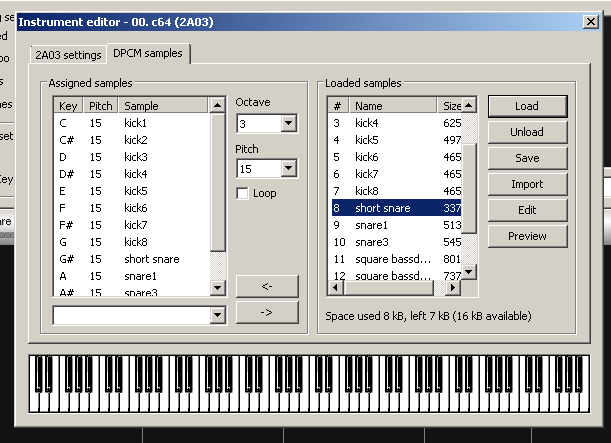
A DPCM editor (i knwo already has one) but some WAVEFORM editor would be UBER NEAT. Since if we had that, we can test/try waveforms in the DPCM channel.
Also some of the feature that can have that editor could be...
- Loopeable preview option.
- Numeric Hexadecimal display (similar to the FDS waveform edition or the MML at a normal instrument)
- Volume control editor? (for not doing it all manual, and will help when you have some quiet samples)
Another Suggest... plz made a bit bigger or scalable the DPCM Samples edition windows. Since when you have more than 15 samples is a mess to set up the notes. Specially with the names and the scroll