Login:
Menu:
Post: Author:
FamiTracker > General > Show Off Your Work > National Park Owner: TheMasterE New post
Page 2 of 4 Sort: Goto Page: << Previous [1] [2] [3] [4] Next >>
Posted: 2010-12-08 10:43 Reply | Quote
nicetas_c


Member for: 6140 days
Location: AB, CA
Status: Offline

#11628
TheMasterE wrote:
...How did you get those screenshots of the waveforms in foobar2000 by the way? I used the oscilloscope as well, but I had to trace it by hand based on the way I saw it...

there should be a key called 'PrtSc' next to F12 for regular QWERTY keyboards


and if you think this can be inaccurate, look at the newer screenshot, this is how we aim for maximum accuracy


Posted: 2010-12-09 04:28 Reply | Quote
TheMasterE

Avatar

Member for: 5772 days
Location: Somewhere in California
Status: Offline

#11643
nicetas_c wrote:
TheMasterE wrote:
...How did you get those screenshots of the waveforms in foobar2000 by the way? I used the oscilloscope as well, but I had to trace it by hand based on the way I saw it...

there should be a key called 'PrtSc' next to F12 for regular QWERTY keyboards


and if you think this can be inaccurate, look at the newer screenshot, this is how we aim for maximum accuracy


I'm far too aware of Printing Screens.

I just wondered how you zoomed in to 4%. And how you got all those intensity numbers there. (Unless you edited them in.)

_______________________
My Tube
AND MY
Steem profyle
Posted: 2010-12-09 10:03 Reply | Quote
nicetas_c


Member for: 6140 days
Location: AB, CA
Status: Offline

#11647
well i didn't zoom in to 4%

Posted: 2010-12-09 10:05 Reply | Quote
TheMasterE

Avatar

Member for: 5772 days
Location: Somewhere in California
Status: Offline

#11648
nicetas_c wrote:
well i didn't zoom in to 4%

Well I guess both Mex and myself are uninformed.

How exactly did you do all you did in those screenshots? Provide details, o' much wiser then me one.

_______________________
My Tube
AND MY
Steem profyle
Posted: 2010-12-09 10:13 Reply | Quote
nicetas_c


Member for: 6140 days
Location: AB, CA
Status: Offline

#11650
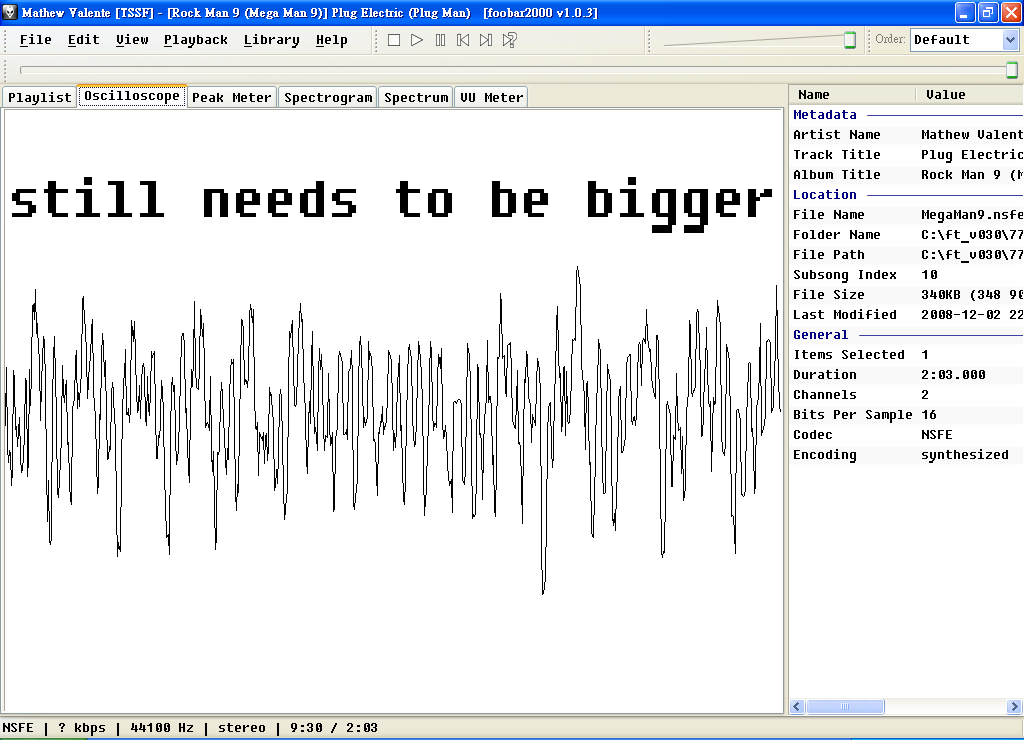
well still needs to find a better way, you know, this

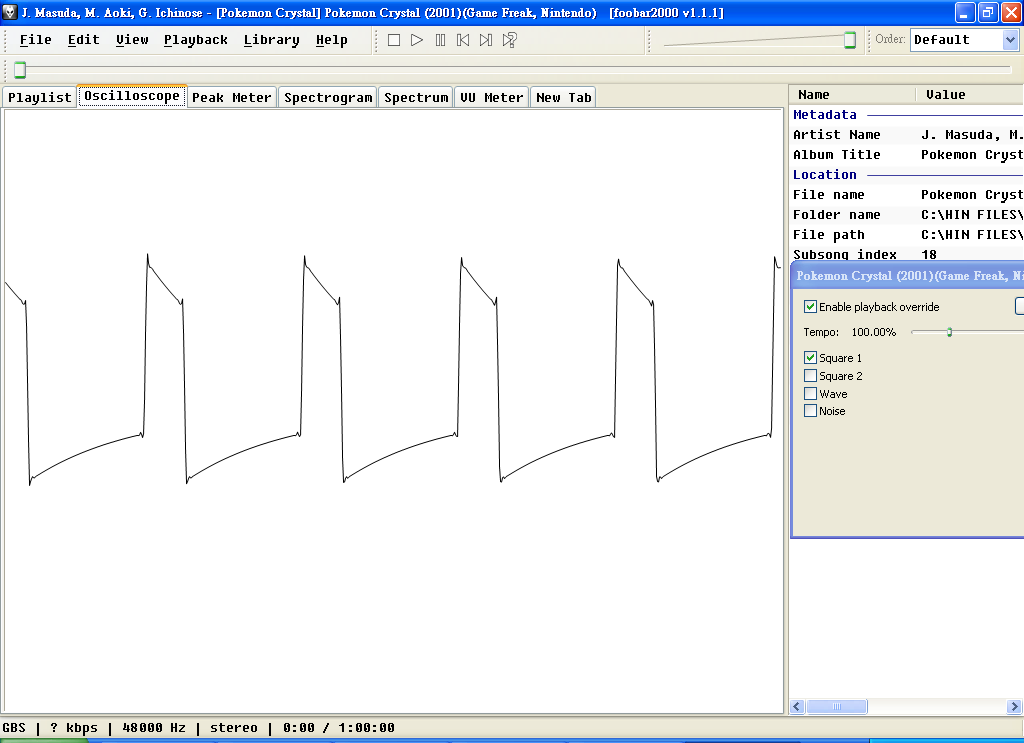
it is a 25% wave, but most oscilloscopes will display curves like this instead of flat lines, if there is one that shows straight lines instead of curve lines, that'd be good

well assuming it's a foobar2000 component


Attachments:
how_come.png (59 Kb)
Posted: 2010-12-10 04:17 Reply | Quote
TechEmporium

Avatar

Member for: 6042 days
Status: Offline

#11657
Most computerized digital oscilloscopes nowadays show straight peaks & troughs (like Tektronix's oscilloscopes). Mind you, every other scope type will show the same curves as in your image.

Those curves that you see at the peaks & troughs are partly due to the original hardware's limitations & partly due to those of the scope.

_______________________
Technology: the one thing that's hated & cursed at by all engineers, technologists, scientists & technicians!

(Lousy modern technology! )
Posted: 2010-12-10 08:00  (Last Edited: 2010-12-10 08:02) Reply | Quote
TheMasterE

Avatar

Member for: 5772 days
Location: Somewhere in California
Status: Offline

#11659
Well then, nicetas.

How exactly DO you show the flat lines instead of the curves?

You did it in your screenshot of the GSC whistle, so there must be a way to do it at all! Please, explain!

_______________________
My Tube
AND MY
Steem profyle
Posted: 2010-12-10 09:08  (Last Edited: 2010-12-10 17:42) Reply | Quote
nicetas_c


Member for: 6140 days
Location: AB, CA
Status: Offline

#11661
TechEmporium wrote:
...(like Tektronix's oscilloscopes)...

well assuming it isn't a foobar2000 component that'd be pretty much useless

well unless there is a way to turn a GBS file into a GB ROM file then it becomes trivial to obtain the waveforms, because I've seen 'GBS Player' ROMs

EDIT: If anyone can go here, congratulations, GBS2GB lies there.

EDIT2: Here Ugetab attached GBS2GB V1.16!!!!!!!! Make an account to grab it NOW.

The latest version is V1.17, if anyone can go to that Angelfire link.

EDIT3: Here is the more proper waveform for the whistle:
0 0 8 8 16 16 24 24 32 32 40 40 48 48 56 56 56 56 60 60 60 60 60 60 60 60 56 56 56 56 56 56 52 52 52 52 48 48 44 44 40 40 36 36 32 32 28 28 24 24 20 20 16 16 12 12 8 8 8 8 4 4 4 4

Posted: 2010-12-11 07:49 Reply | Quote
TheMasterE

Avatar

Member for: 5772 days
Location: Somewhere in California
Status: Offline

#11669
nicetas_c wrote:
TechEmporium wrote:
...(like Tektronix's oscilloscopes)...

well assuming it isn't a foobar2000 component that'd be pretty much useless

well unless there is a way to turn a GBS file into a GB ROM file then it becomes trivial to obtain the waveforms, because I've seen 'GBS Player' ROMs

EDIT: If anyone can go here, congratulations, GBS2GB lies there.

EDIT2: Here Ugetab attached GBS2GB V1.16!!!!!!!! Make an account to grab it NOW.

The latest version is V1.17, if anyone can go to that Angelfire link.

EDIT3: Here is the more proper waveform for the whistle:
0 0 8 8 16 16 24 24 32 32 40 40 48 48 56 56 56 56 60 60 60 60 60 60 60 60 56 56 56 56 56 56 52 52 52 52 48 48 44 44 40 40 36 36 32 32 28 28 24 24 20 20 16 16 12 12 8 8 8 8 4 4 4 4


So I have V1.17. What do I do now? I've created the GB file of Crystal, popped it into my emulator, and all I get is the same song selections I get if I were to play it on Foobar. How do I look at the waveforms and their intensities like you did on your first few screenshots of Foobar?

_______________________
My Tube
AND MY
Steem profyle
Posted: 2010-12-11 07:51  (Last Edited: 2010-12-11 07:51) Reply | Quote
nicetas_c


Member for: 6140 days
Location: AB, CA
Status: Offline

#11670
1. Use VisualBoyAdvance (preferably, but I don't know what else to use).
2. Open the memory viewer.
3. Go to the I/O part.
4. Take the whole 16 bytes in the row FF30.

and check 'automatically update'

Posted: 2010-12-11 07:55 Reply | Quote
TheMasterE

Avatar

Member for: 5772 days
Location: Somewhere in California
Status: Offline

#11671
nicetas_c wrote:
TheMasterE wrote:
...How did you get those screenshots of the waveforms in foobar2000 by the way? I used the oscilloscope as well, but I had to trace it by hand based on the way I saw it...

there should be a key called 'PrtSc' next to F12 for regular QWERTY keyboards


and if you think this can be inaccurate, look at the newer screenshot, this is how we aim for maximum accuracy


Well then how DID you get it bigger?

_______________________
My Tube
AND MY
Steem profyle
Posted: 2010-12-11 08:03  (Last Edited: 2010-12-11 08:06) Reply | Quote
TheMasterE

Avatar

Member for: 5772 days
Location: Somewhere in California
Status: Offline

#11672
nicetas_c wrote:
1. Use VisualBoyAdvance (preferably, but I don't know what else to use).
2. Open the memory viewer.
3. Go to the I/O part.
4. Take the whole 16 bytes in the row FF30.

and check 'automatically update'

I dumped the FF30 row into a .dmp file and I copied each number and letter on a text document. What do I do with it now?

_______________________
My Tube
AND MY
Steem profyle
Posted: 2010-12-11 08:14 Reply | Quote
nicetas_c


Member for: 6140 days
Location: AB, CA
Status: Offline

#11673
you don't need to dump that row, just copy what you see

now multiply every nymber by 4, and then repeat it twice. here is an example

00112233445566035899aabbccddeef4
to
0,0,4,4,8,8,12,12,16,16,20,20,24,24,0,12,20,32,36,36,40,40,44,44,48,48,52,52,56,56,60,16
to
0,0,0,0,4,4,4,4,8,8,8,8,12,12,12,12,16,16,16,16,20,20,20,20,24,24,24,24,0,0,12,12,20,20,32,32,36,36,36,36,40,40,40,40,44,44,44,44,48,48,48,48,52,52,52,52,56,56,56,56,60,60,16,16

Posted: 2010-12-11 08:15 Reply | Quote
nicetas_c


Member for: 6140 days
Location: AB, CA
Status: Offline

#11674
and to make that screen bigger you simply enable the layout editing mode

RE: National Park Posted: 2010-12-11 16:45 Reply | Quote
rmk


Member for: 6060 days
Location: crewet, Indonesia
Status: Offline

#11676
i love it !! yeaaah

Page 2 of 4 Sort: Goto Page: << Previous [1] [2] [3] [4] Next >>